
Travel Cards2.55 - Google Play
You'll be able to see results in few seconds.
Publisher Description
NEW FEATURE: Exclusively on Travel Cards Elite. The Location Finder which uses the phone's GPS functionality. You can now find hotels, restaurants, stores, car rentals, groceries, businesses, and health care facilities that use your rewards cards from your location (US & Canada only). If you're in a new area and need to find a hotel but want to use your loyalty cards to earn your points, use the Location Finder and you'll get the list of hotels within your immediate area.
Travel Cards for Android puts your loyalty programs on your phone, and at your finger tips. As an elite traveler earn and use your rewards, and reduce the clutter and hassle of plastic cards or stored notes. Don’t lose out on rewards because you can’t find your cards, numbers, or mix match of expire dates and types of membership programs. Not to mention, what would happen if you lost your phone – yikes!
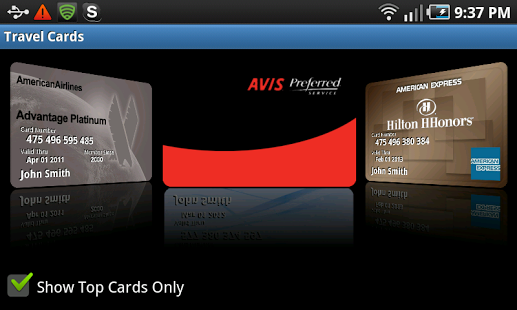
Step up to the counter, flash your high fidelity card image and get the points and treatment you deserve. Travel Cards’ innovative display shows your details – just like the plastic you seem to never have with you. If you have a platinum or elite status, people see it right away. And finding your cards, no problems, flip through them with Card Flow, or use the List View. You can create a Top Cards folder or search. And security, yes, cards are safely stored with pass code and advanced security features. Cards are not only stored safely they are backed up online with a Cloud Sync, where family and friends also can access them – only if you give them the privilege.
Features:
Simplify your travel:
-Create your card library from over 1800 programs and card images
-Organize most frequently used with Top Cards
-Search using Card Flow, List View or two types of search
-Find hotels, and places that take your loyalty awards from your location
Get recognized. Don’t miss out:
-Flash a high fidelity image of your card and be recognized
-Access program details through direct links to websites and phone numbers
-Get notified of expiration and other program details with alerts
Protect yourself:
-Set the level of security that best fits you – none, medium or high
-Secure your information with pass code protection
-Use information purge advance setting if your phone is lost or stolen
Access and share from a Cloud:
-Browser based access, backup and sharing to an online database
-Friends and family can access your programs online
-Sync information from your phone to the Cloud
Checkout more details at: http://obimobile.com/travelcards.html, or join us on facebook: travelcards
About Travel Cards
The company that develops Travel Cards is ObiMobile.com. The latest version released by its developer is 2.55.
To install Travel Cards on your Android device, just click the green Continue To App button above to start the installation process. The app is listed on our website since 2014-04-22 and was downloaded 0 times. We have already checked if the download link is safe, however for your own protection we recommend that you scan the downloaded app with your antivirus. Your antivirus may detect the Travel Cards as malware as malware if the download link to com.geniuswave.android.travelcard is broken.
How to install Travel Cards on your Android device:
- Click on the Continue To App button on our website. This will redirect you to Google Play.
- Once the Travel Cards is shown in the Google Play listing of your Android device, you can start its download and installation. Tap on the Install button located below the search bar and to the right of the app icon.
- A pop-up window with the permissions required by Travel Cards will be shown. Click on Accept to continue the process.
- Travel Cards will be downloaded onto your device, displaying a progress. Once the download completes, the installation will start and you'll get a notification after the installation is finished.
Program Details
System requirements
Download information
Pricing
Version History
version 2.55
posted on 2014-04-22
Bug fix on sync error,New Cards,1. USAA,2. National Car Rental,3. Omni Hotels,4. Fairmont Hotels,5. MC Sports
version 2.52
posted on 2011-06-03
Several fixes and updates
Disclaimer
Official Google Play Link
We do not host Travel Cards on our servers. We did not scan it for viruses, adware, spyware or other type of malware. This app is hosted by Google and passed their terms and conditions to be listed there. We recommend caution when installing it.
The Google Play link for Travel Cards is provided to you by apps112.com without any warranties, representations or guarantees of any kind, so access it at your own risk.
If you have questions regarding this particular app contact the publisher directly. For questions about the functionalities of apps112.com contact us.
